Connect Data Warehouse
Goal: Connect your data warehouse to Recce Cloud to enable data diffing on PRs.
Recce Cloud supports Snowflake, Databricks, BigQuery, and Redshift. Using a different warehouse? Contact us at [email protected].
Prerequisites
- Warehouse credentials with read access
- Network access configured (IP whitelisting if required)
Security
Recce Cloud queries your warehouse directly to compare Base and Current environments. Recce encrypts and stores credentials securely. Read-only access is sufficient for all data diffing features.
Connect Snowflake
Option 1: Username/Password
| Field | Description | Example |
|---|---|---|
| Account | Snowflake account identifier | xxxxxx.us-central1.gcp |
| Username | Database username | MY_USER |
| Password | Database password | my_password |
| Role | Role with read access | ANALYST_ROLE |
| Warehouse | Compute warehouse name | WH_LOAD |
Option 2: Key Pair Authentication
| Field | Description | Example |
|---|---|---|
| Account | Snowflake account identifier | xxxxxx.us-central1.gcp |
| Username | Service account username | MY_USER |
| Private Key | PEM-formatted private key | -----BEGIN RSA PRIVATE KEY-----... |
| Passphrase | Key passphrase (if encrypted) | my_passphrase |
| Role | Role with read access | ANALYST_ROLE |
| Warehouse | Compute warehouse name | WH_LOAD |
Connect Databricks
Option 1: Personal Access Token
| Field | Description | Example |
|---|---|---|
| Host | Workspace URL | adb-1234567890123456.7.azuredatabricks.net |
| HTTP Path | SQL warehouse path | /sql/1.0/warehouses/abc123def456 |
| Token | Personal access token | dapiXXXXXXXXXXXXXXXXXXXXXXX |
| Catalog | Unity Catalog name (optional) | my_catalog |
Option 2: OAuth (M2M)
| Field | Description | Example |
|---|---|---|
| Host | Workspace URL | adb-1234567890123456.7.azuredatabricks.net |
| HTTP Path | SQL warehouse path | /sql/1.0/warehouses/abc123def456 |
| Client ID | Service principal client ID | 12345678-1234-1234-1234-123456789012 |
| Client Secret | Service principal secret | dose1234567890abcdef |
| Catalog | Unity Catalog name (optional) | my_catalog |
Note: OAuth M2M is auto-enabled in Databricks accounts. For setup details, see dbt Databricks setup.
Connect BigQuery
| Field | Description | Example |
|---|---|---|
| Project | GCP project ID | my-gcp-project-123456 |
| Service Account JSON | Full JSON key file contents | {"type": "service_account", ...} |
Note: For authentication, we currently provide support for service account JSON only. More details here.
Connect Redshift
| Field | Description | Example |
|---|---|---|
| Host | Cluster endpoint | my-cluster.abc123xyz.us-west-2.redshift.amazonaws.com |
| Port | Database port | 5439 (Default) |
| Database | Database name | analytics_db |
| Username | Database user | admin_user |
| Password | Database password | my_password |
Note: We currently support Database (Password-based authentication) only. More details here.
Save Connection
After entering your connection details, click Save. Recce Cloud runs a connection test automatically and displays "Connected" on success.
Verify Success
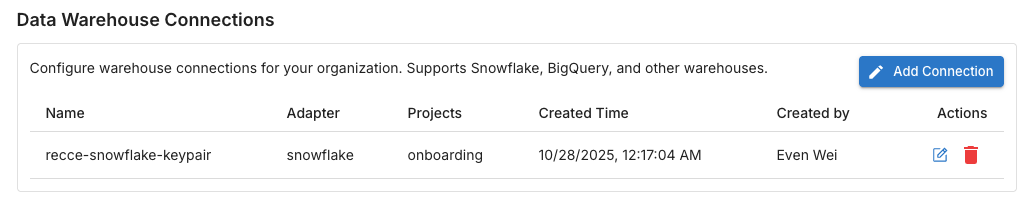
Navigate to Organization Settings in Recce Cloud. Your data warehouse should appear.
Troubleshooting
| Issue | Solution |
|---|---|
| Connection refused | Whitelist Recce Cloud IP ranges in your network configuration |
| Authentication failed | Verify credentials and regenerate if expired |
| Permission denied on table | Grant SELECT permissions on target schemas |