---
title: Data Diffing
---
# Data Diffing
Data diffing validates that your model changes produce the expected results. Each diff type serves a different validation purpose, from quick row counts to detailed value comparisons.
## Overview
| Diff Type | Purpose | Query Cost | Best For |
|-----------|---------|------------|----------|
| [Row Count](#row-count-diff) | Compare record counts | Low | Quick sanity check |
| [Profile](#profile-diff) | Column-level statistics | Medium | Distribution analysis |
| [Value](#value-diff) | Row-by-row comparison | High | Exact match verification |
| [Top-K](#top-k-diff) | Categorical distribution | Medium | Categorical columns |
| [Histogram](#histogram-diff) | Numeric distribution | Medium | Numeric columns |
| [Query](#query-diff) | Custom SQL comparison | Varies | Flexible validation |
## Choosing the Right Diff
A common approach is to start with lightweight checks and progressively drill down as needed. This decision tree provides a suggested workflow:
```text
Start with Row Count
│
├─ Counts match? → Profile Diff for deeper stats
│
└─ Counts differ?
│
├─ Expected? → Document in checklist
│
└─ Unexpected? → Value Diff to find specific changes
│
└─ For specific columns:
• Categorical → Top-K Diff
• Numeric → Histogram Diff
• Custom logic → Query Diff
```
## Working with results
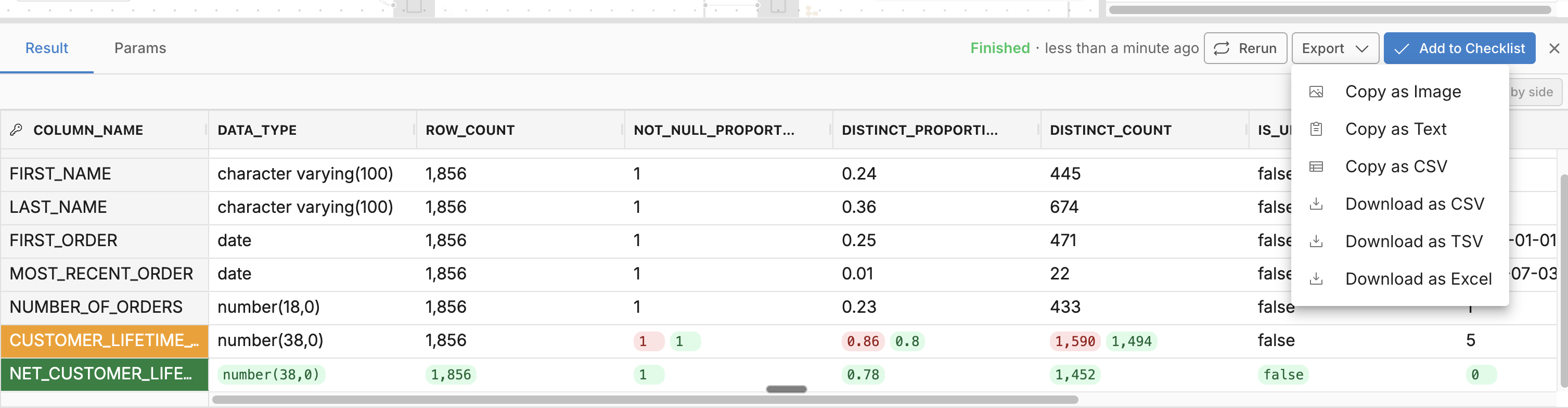
After running any diff, you can rerun, export, or download the results.
- **Rerun** - Refresh after model changes
- **Export** - Copy as image, text, or CSV for PR comments and Slack
- **Download** - Save as CSV, TSV, or Excel for offline analysis
{: .shadow}
Result options: rerun, export, and download
---
## Row Count Diff
Compare the number of rows between base and current environments.
**When to use:** Quick validation that filters or joins didn't unexpectedly add or remove records.
### Running Row Count Diff
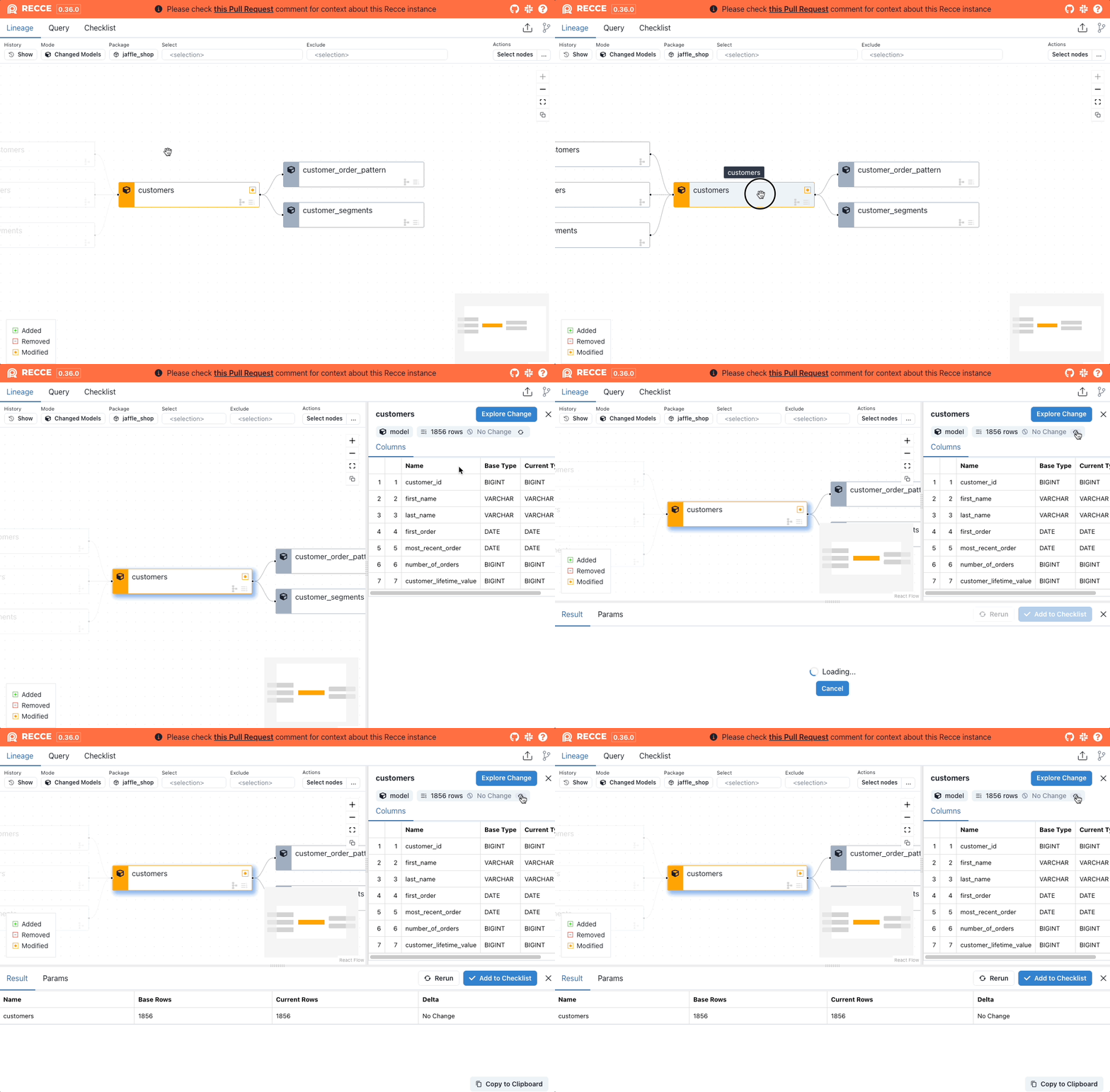
1. Click a model in the Lineage DAG
2. Click **Explore Change** > **Row Count Diff**
{: .shadow}
Row Count Diff for a single model
### Interpreting Results
| Result | Meaning |
|--------|---------|
| Count unchanged | No records added or removed |
| Count increased | New records added (check if expected) |
| Count decreased | Records removed (verify filters/joins) |
---
## Profile Diff
Compare column-level statistics between environments.
**When to use:** Validate that transformations didn't unexpectedly change data distributions.
### Statistics Compared
| Statistic | Description |
|-----------|-------------|
| Row count | Total records |
| Not null % | Proportion of non-null values |
| Distinct % | Proportion of unique values |
| Distinct count | Number of unique values |
| Is unique | Whether all values are unique |
| Min / Max | Range of values |
| Average / Median | Central tendency |
### Running Profile Diff
1. Select a model from the Lineage DAG
2. Click **Explore Change** > **Profile Diff**
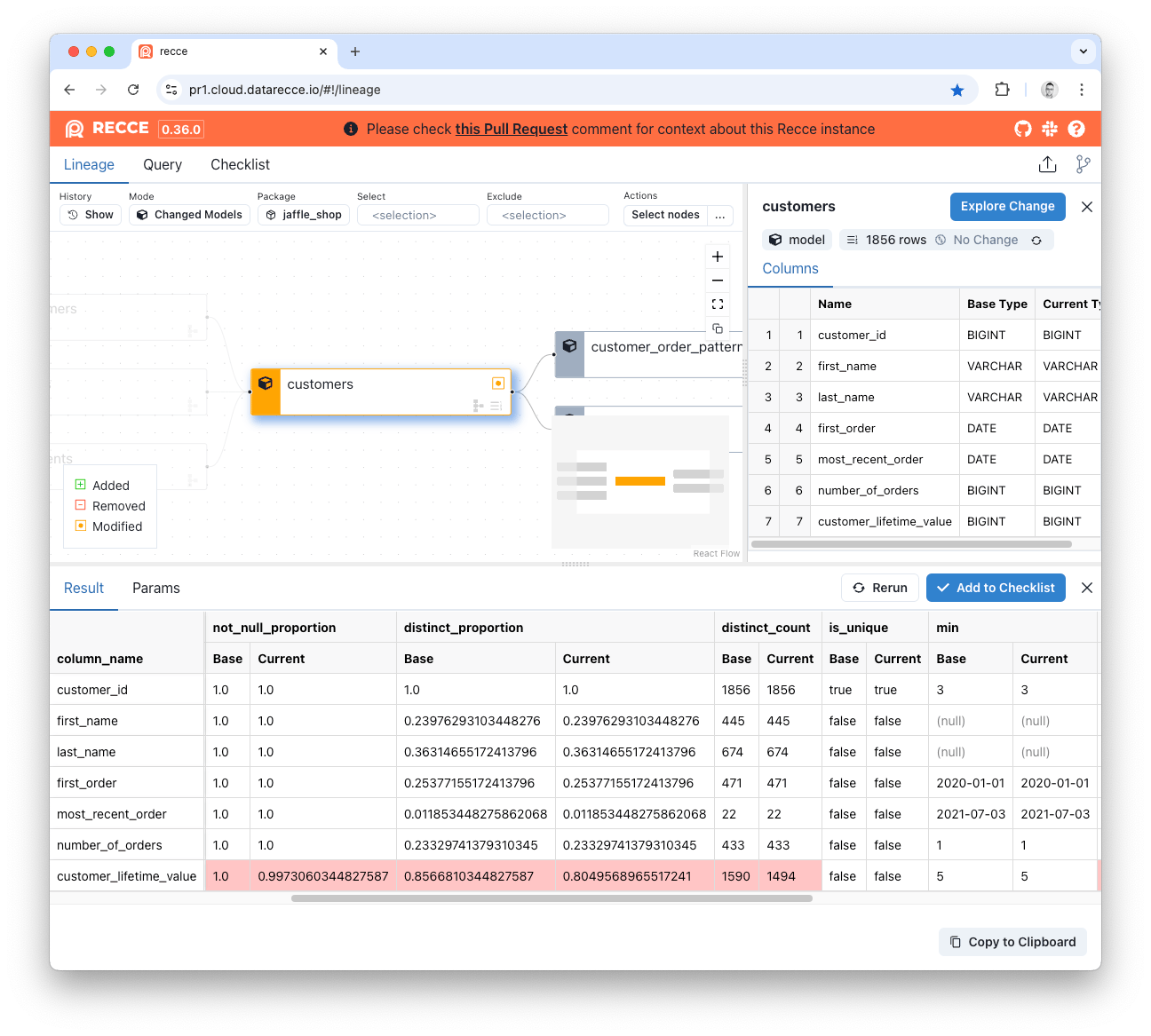
Profile Diff showing column statistics
### Interpreting Results
Look for unexpected changes in:
- **Null rates** - Did a column become more/less nullable?
- **Distinct counts** - Did cardinality change unexpectedly?
- **Min/Max** - Did value ranges shift?
---
## Value Diff
Compare actual values row-by-row using primary keys.
**When to use:** Verify exact data matches when precision matters.
### How It Works
Value Diff uses primary keys to match records between environments, then compares each column value. Primary keys are auto-detected from columns with the `unique` test.
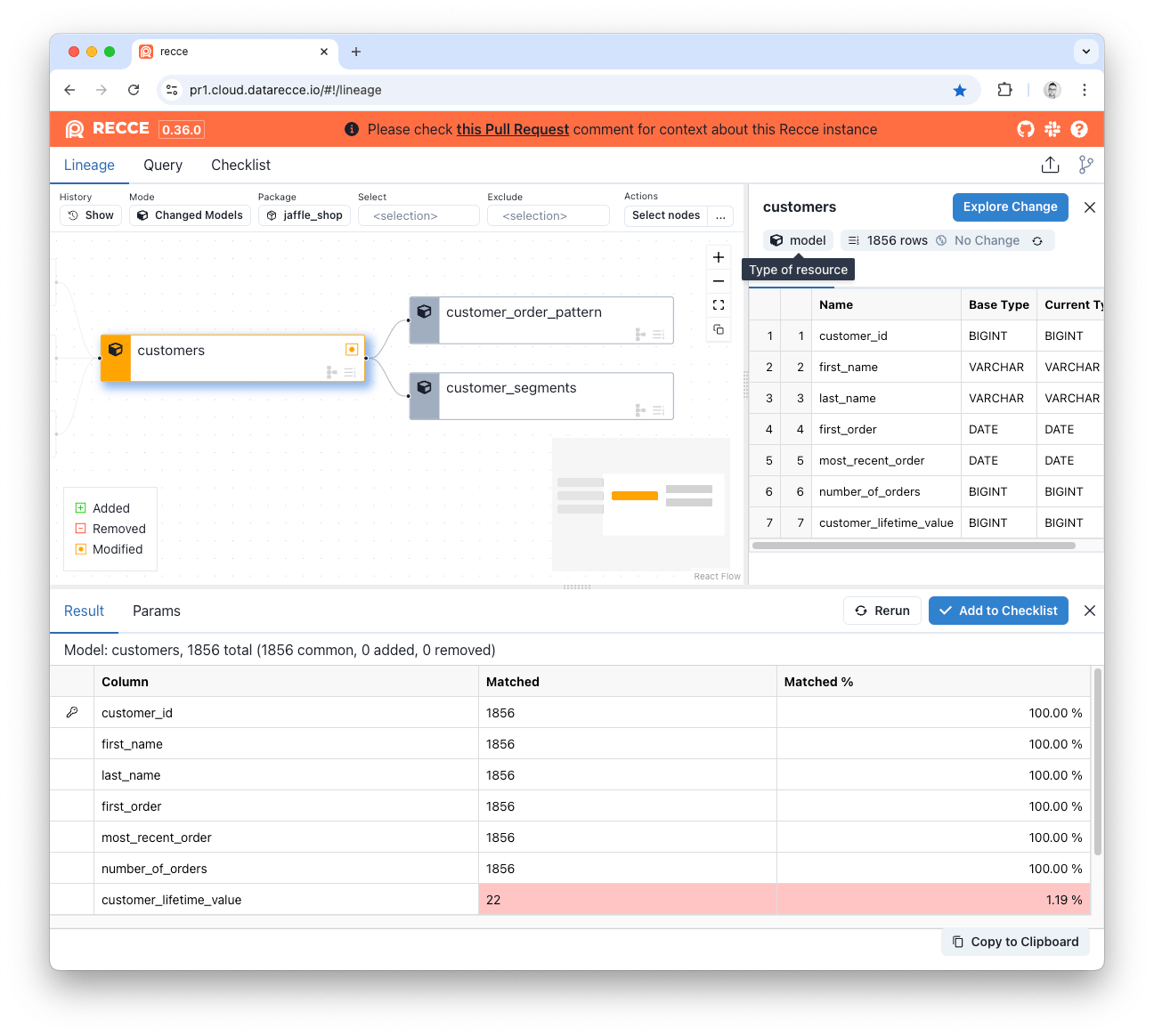
Value Diff showing match percentages
### Result Columns
| Column | Meaning |
|--------|---------|
| **Added** | New PKs in current (not in base) |
| **Removed** | PKs in base (not in current) |
| **Matched** | Count of matching values for common PKs |
| **Matched %** | Percentage match for common PKs |
### Viewing Mismatches
Click **show mismatched values** on a column to see row-level differences:
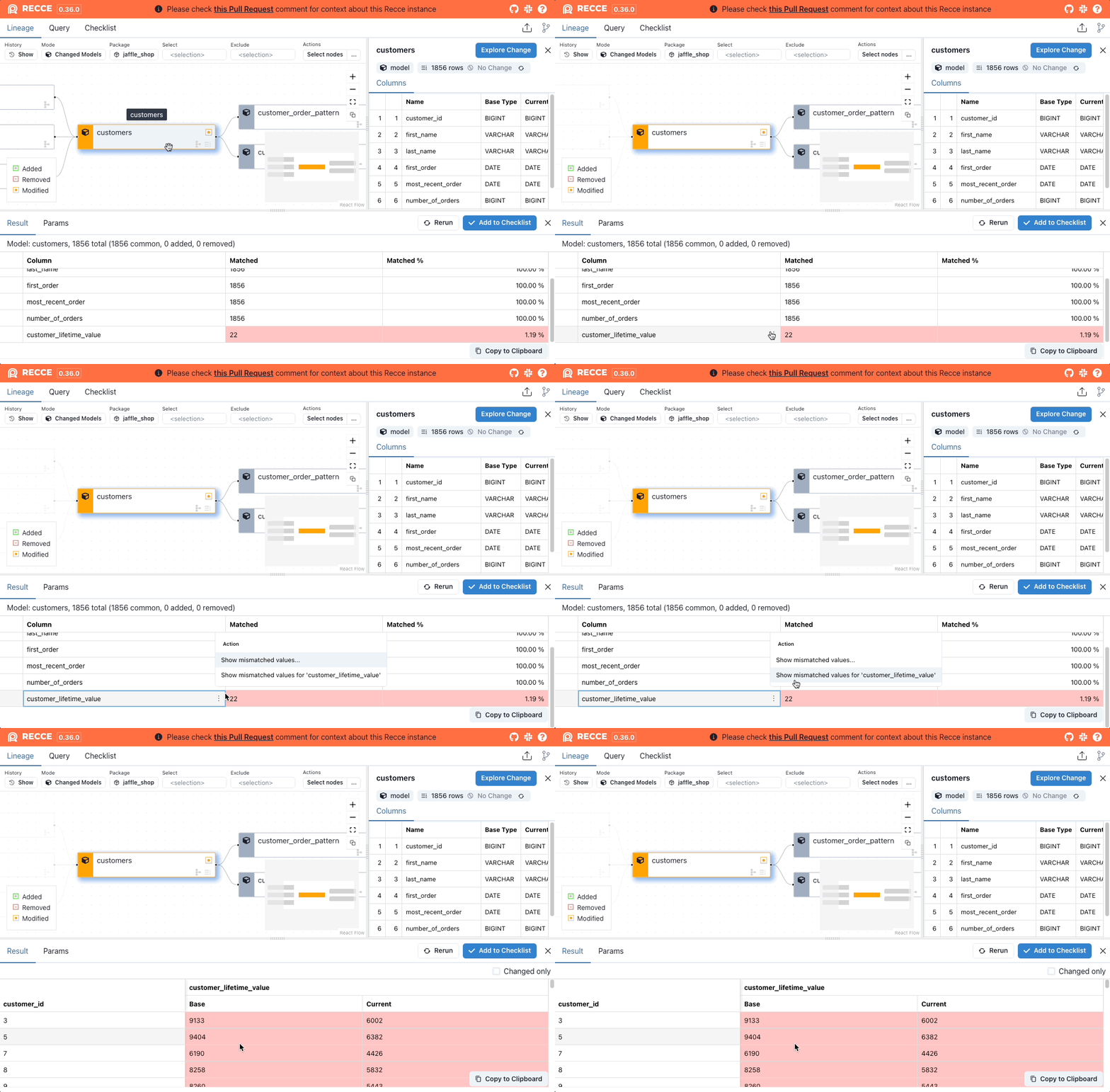{: .shadow}
---
## Top-K Diff
Compare the distribution of categorical columns by showing the most frequent values.
**When to use:** Validate categorical data hasn't shifted unexpectedly (status codes, categories, regions).
### Running Top-K Diff
**Via Explore Change:**
1. Select model > **Explore Change** > **Top-K Diff**
2. Select a column
3. Click **Execute**
**Via Column Menu:**
1. Hover over a column in Node Details
2. Click **...** > **Top-K Diff**
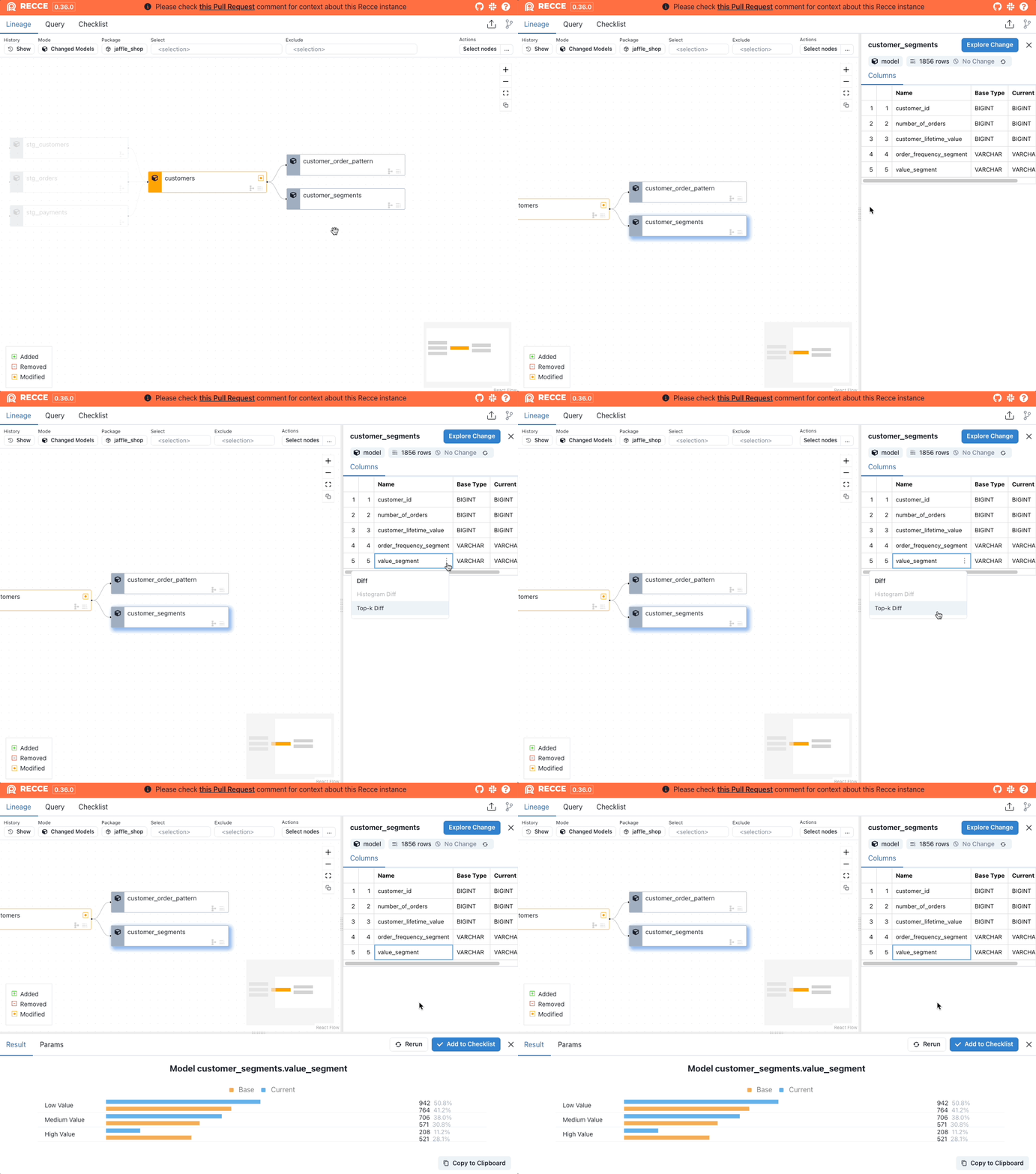{: .shadow}
Generate a Top-K Diff from the column menu
### Options
| Option | Description |
|--------|-------------|
| Top 10 | Default view |
| Top 50 | Expanded view for more categories |
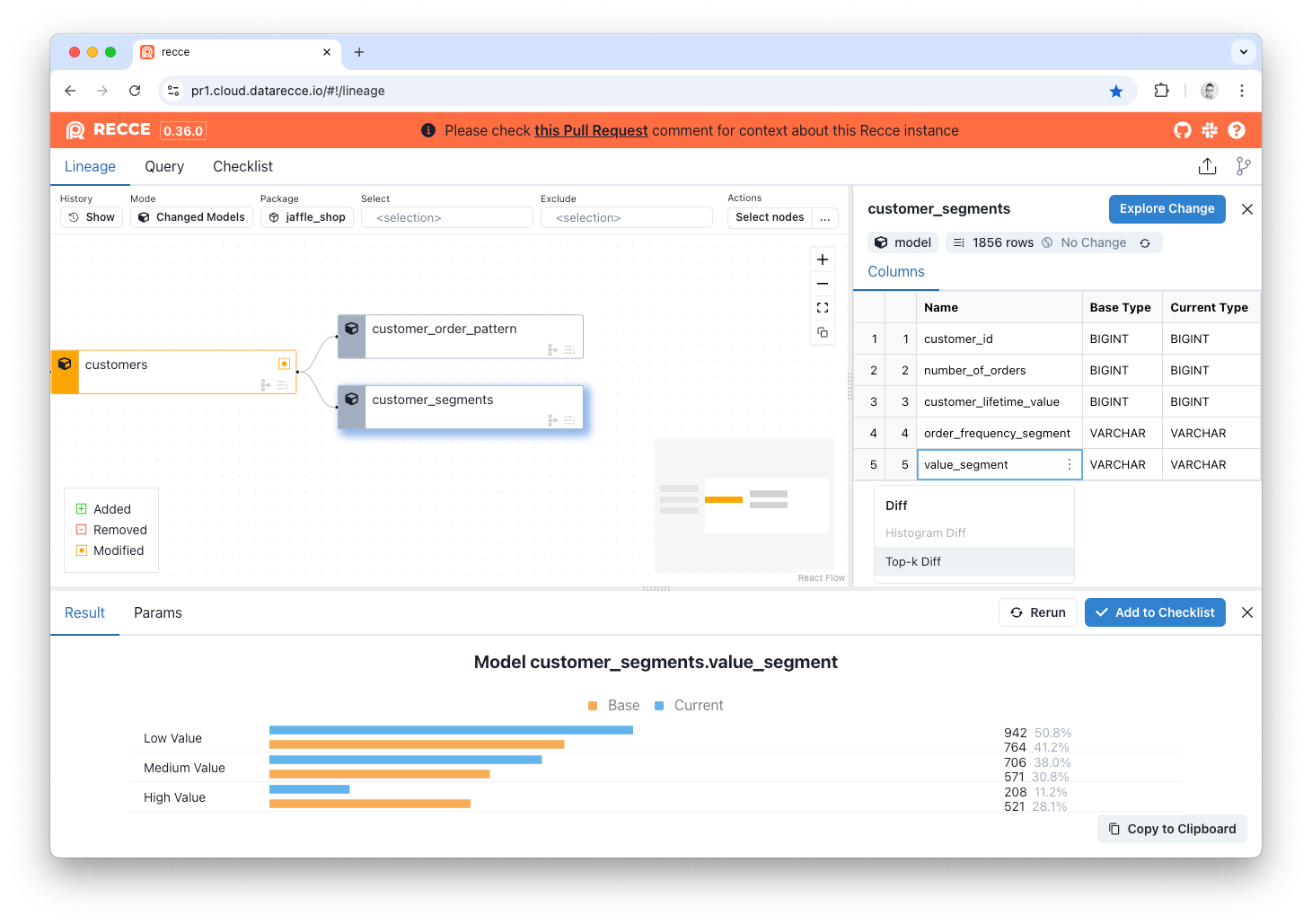
Top-K Diff comparing category distributions
---
## Histogram Diff
Compare the distribution of numeric columns using binned histograms.
**When to use:** Validate numeric distributions haven't shifted (amounts, scores, durations).
### Running Histogram Diff
**Via Explore Change:**
1. Select model > **Explore Change** > **Histogram Diff**
2. Select a numeric column
3. Click **Execute**
**Via Column Menu:**
1. Hover over a numeric column
2. Click **...** > **Histogram Diff**
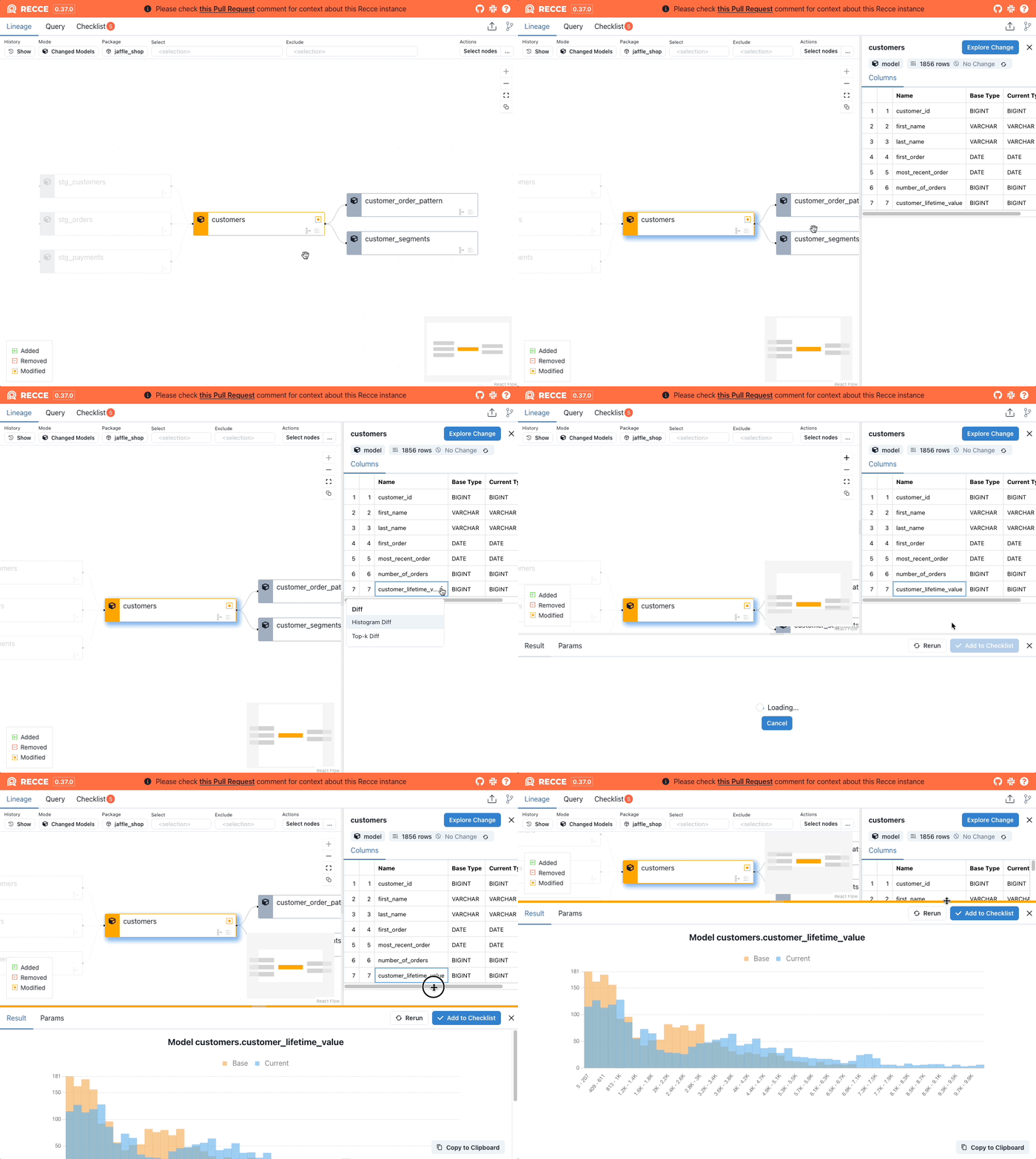{: .shadow}
Generate a Histogram Diff from column options
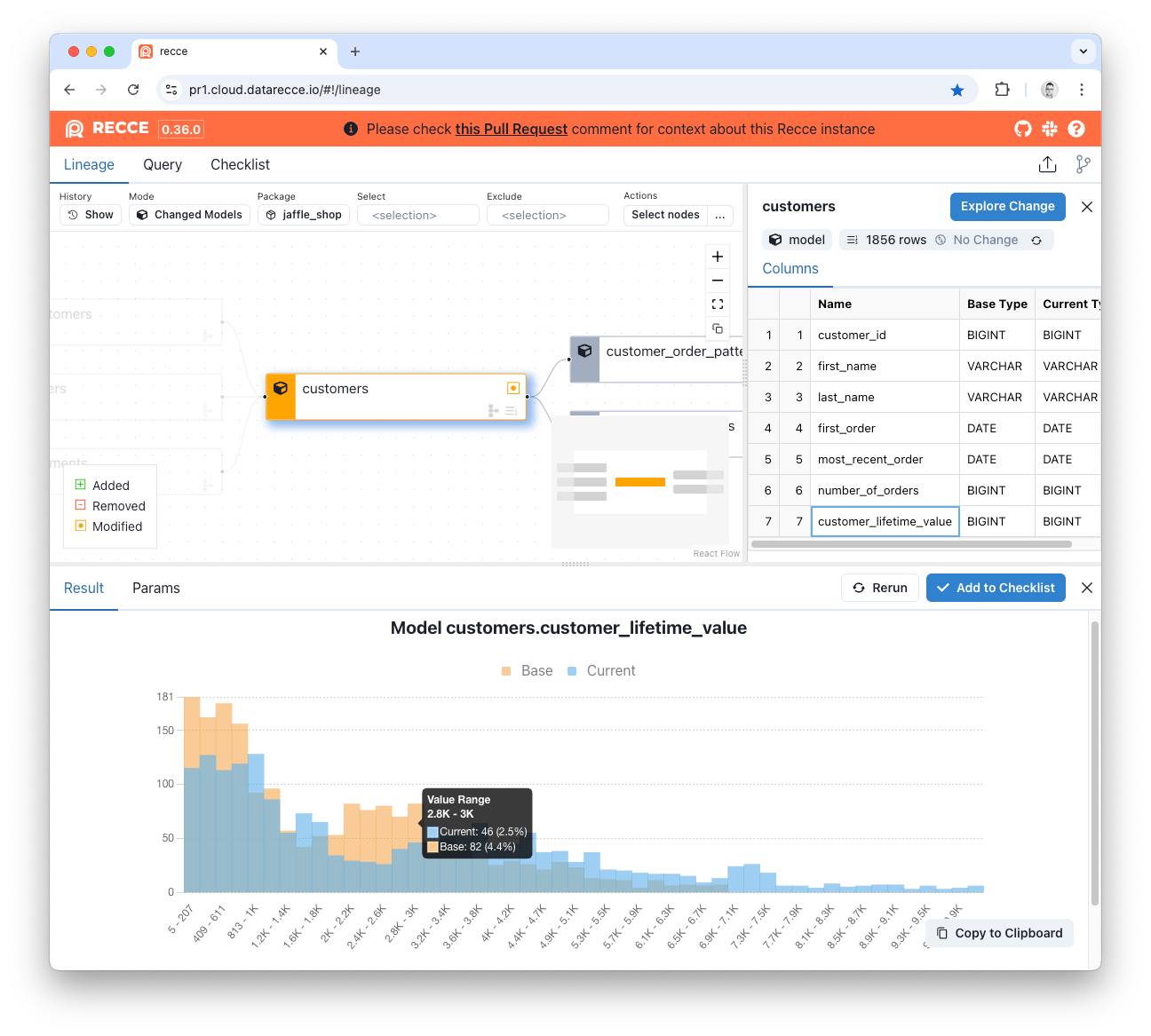
Histogram Diff showing overlaid distributions
---
## Query Diff
Write custom SQL to compare any query results between environments.
**When to use:** Flexible validation for complex scenarios not covered by standard diffs.
### Running Query Diff
1. Open the Query page
2. Write SQL using dbt syntax:
```sql
select * from {{ ref("mymodel") }}
```
3. Click **Run Diff**
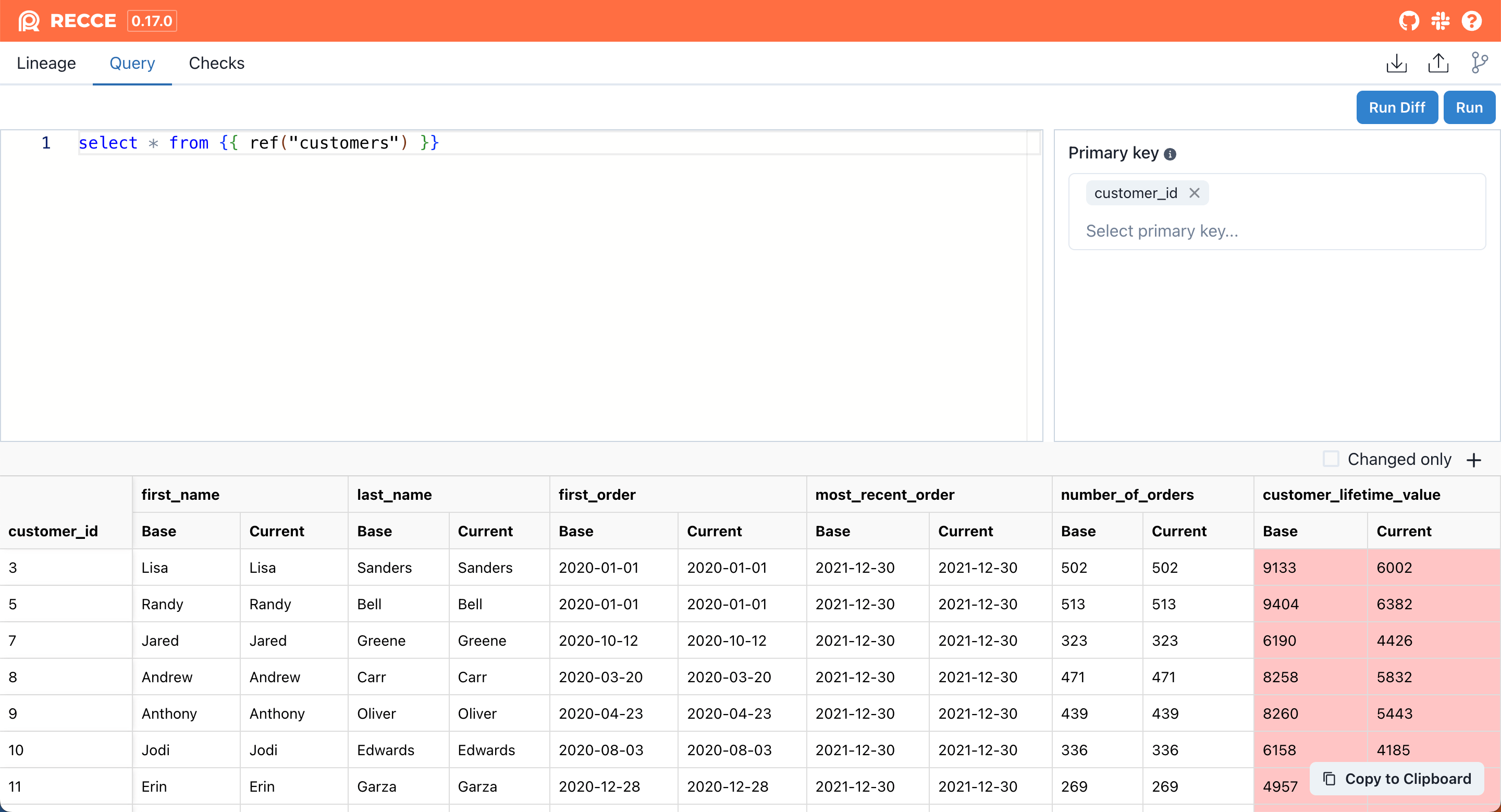
Query Diff interface
### Comparison Modes
| Mode | When to Use | How It Works |
|------|-------------|--------------|
| **Client-side** | No primary key | Fetches first 2,000 rows, compares locally |
| **Warehouse** | Primary key specified | Compares in warehouse, shows only differences |
!!! tip "Keyboard Shortcuts (Mac)"
- `⌘ Enter` - Run query
- `⌘ ⇧ Enter` - Run query diff
### Result Options
| Option | Description |
|--------|-------------|
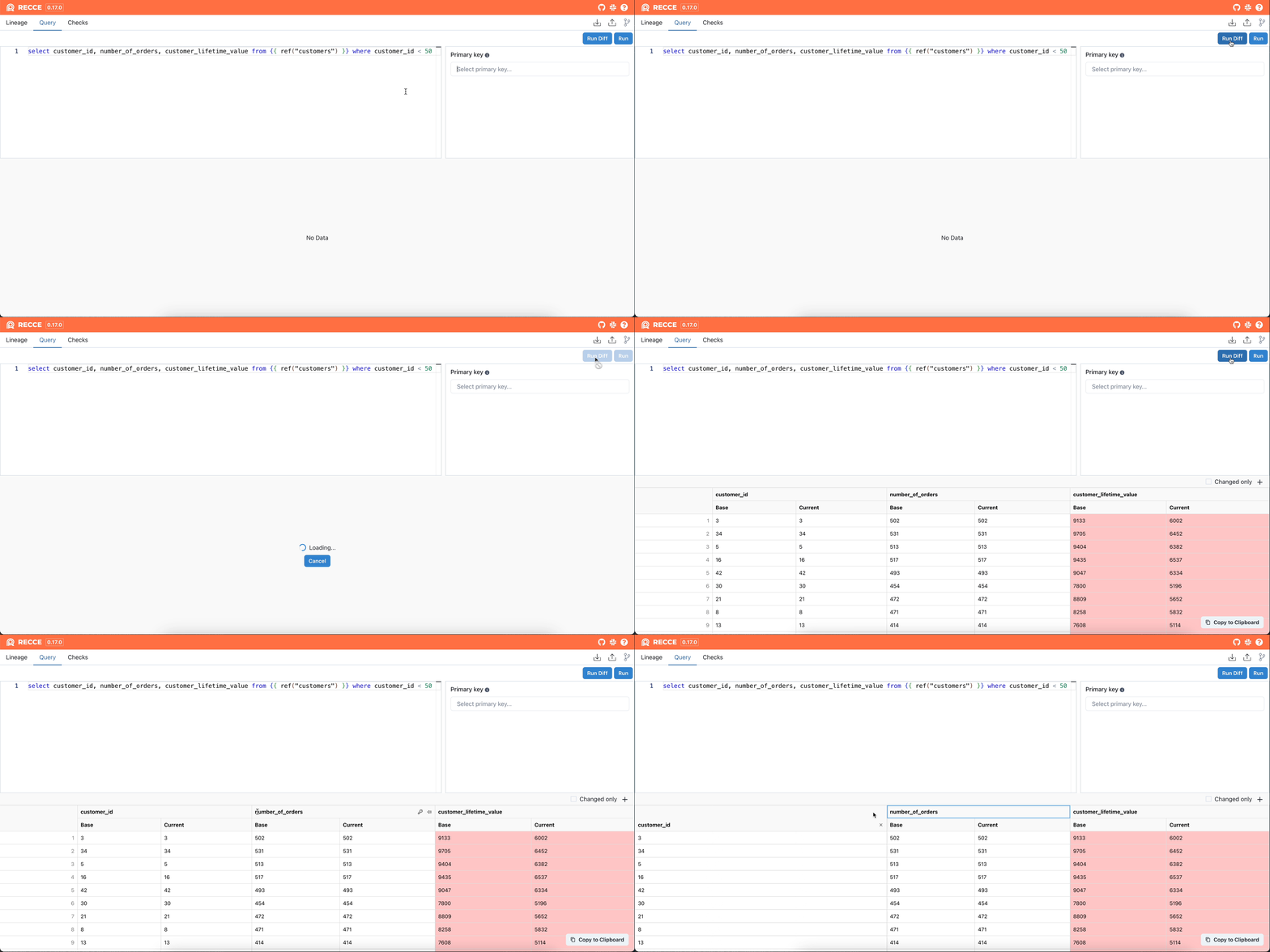
| **Primary Key** | Click key icon to set comparison key |
| **Pinned Column** | Show specific columns first |
| **Changed Only** | Hide unchanged rows and columns |
{: .shadow}
Query Diff with filtering options
---
## Related
- [Validation Techniques](../using-recce/data-developer.md#validation-techniques) - How to use data diffing in your workflow
- [Lineage Diff](lineage-diff.md) - Visualize change impact
- [Checklist](../collaboration/checklist.md) - Save validation results