Jaffle Shop Tutorial
When you change a dbt model, how do you know what data actually changed? Running your model isn't enough. You need to compare outputs against the previous version.
Goal: Make a model change and validate the data impact using Recce with the dbt Labs example project.
This tutorial uses DuckDB for a local, file-based setup. No cloud warehouse needed.
You'll work with jaffle_shop_duckdb, a sample project from dbt Labs. You'll modify a model, see how the change affects downstream data, and add a validation to your checklist.
Prerequisites
- Python 3.9+ installed
- Git installed
Steps
1. Clone Jaffle Shop
git clone [email protected]:dbt-labs/jaffle_shop_duckdb.git
cd jaffle_shop_duckdb
Expected result: You're in the jaffle_shop_duckdb directory.
2. Set up virtual environment
Expected result: Your terminal prompt shows (venv).
3. Install dependencies
Expected result: Both dbt and Recce install without errors.
4. Configure DuckDB profile for comparison
Recce compares two environments. Edit ./profiles.yml to add a prod target for the base environment.
Add the following under outputs::
Your complete profiles.yml should look like:
jaffle_shop:
target: dev
outputs:
dev:
type: duckdb
path: 'jaffle_shop.duckdb'
threads: 24
    prod:
      type: duckdb
      path: 'jaffle_shop.duckdb'
      schema: prod
      threads: 24
Expected result: profiles.yml has both dev and prod targets.
5. Build base environment
Generate the production data and artifacts that Recce uses as baseline.
dbt seed --target prod
dbt run --target prod
dbt docs generate --target prod --target-path ./target-base
Expected result: target-base/ folder contains manifest.json and catalog.json.
6. Make a model change
Edit ./models/staging/stg_payments.sql to introduce a data change:
renamed as (
         payment_method,

-        -- `amount` is currently stored in cents, so we convert it to dollars
-        amount / 100 as amount
+        amount

         from source
)
This removes the cents-to-dollars conversion, so downstream models will now show values 100x larger.
Expected result: stg_payments.sql outputs amount in cents instead of dollars.
7. Build development environment
Expected result: target/ folder contains updated manifest.json and catalog.json.
8. Start Recce server
Expected result: Server starts at http://0.0.0.0:8000
Open http://localhost:8000 in your browser. The Lineage tab shows stg_payments and downstream models highlighted.

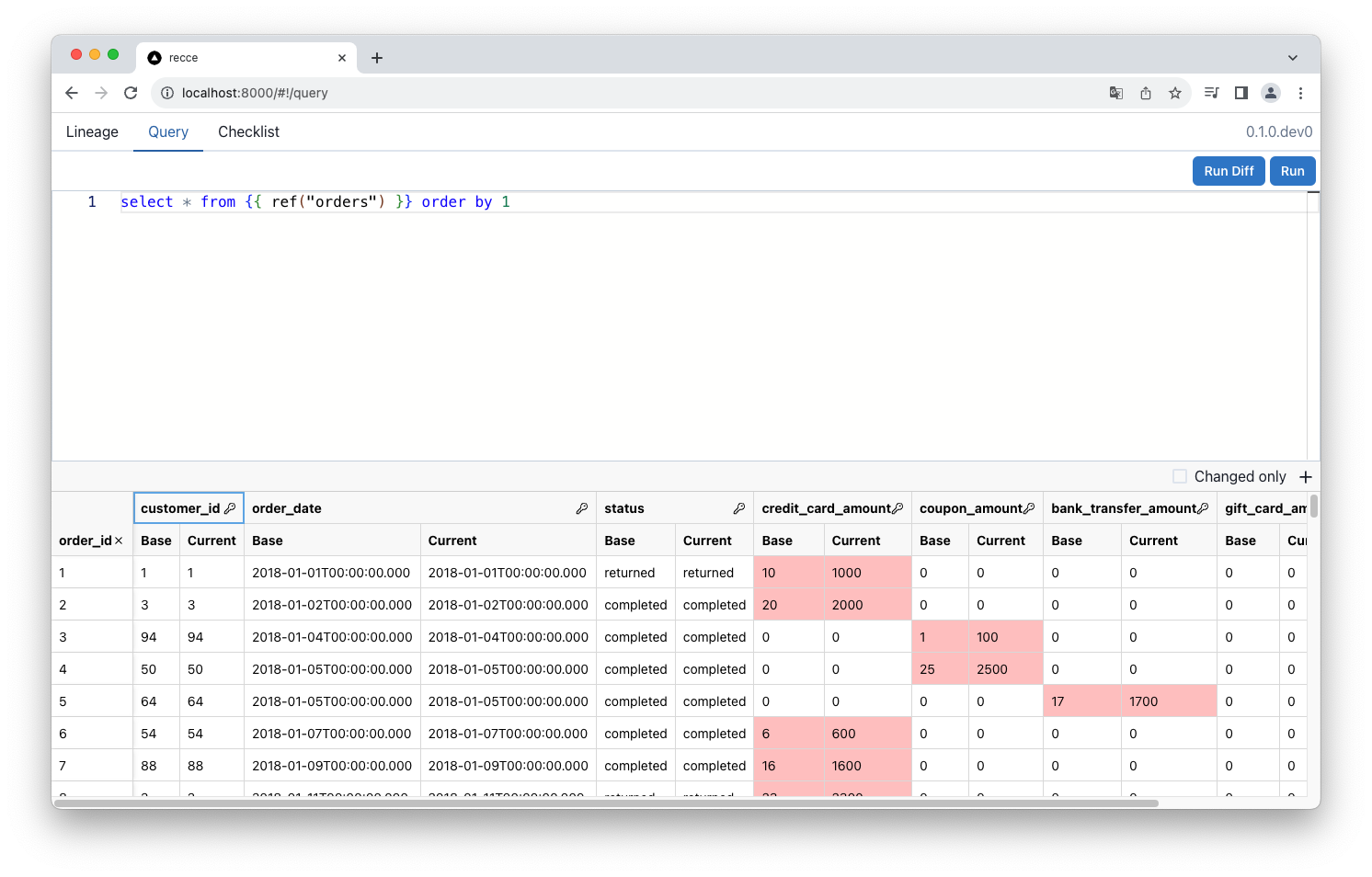
9. Run a Query Diff
Switch to the Query tab and run:
Click Run Diff (or press Cmd+Shift+Enter).
Expected result: Query Diff shows the amount column with values 100x larger in the current environment.
10. Add to checklist
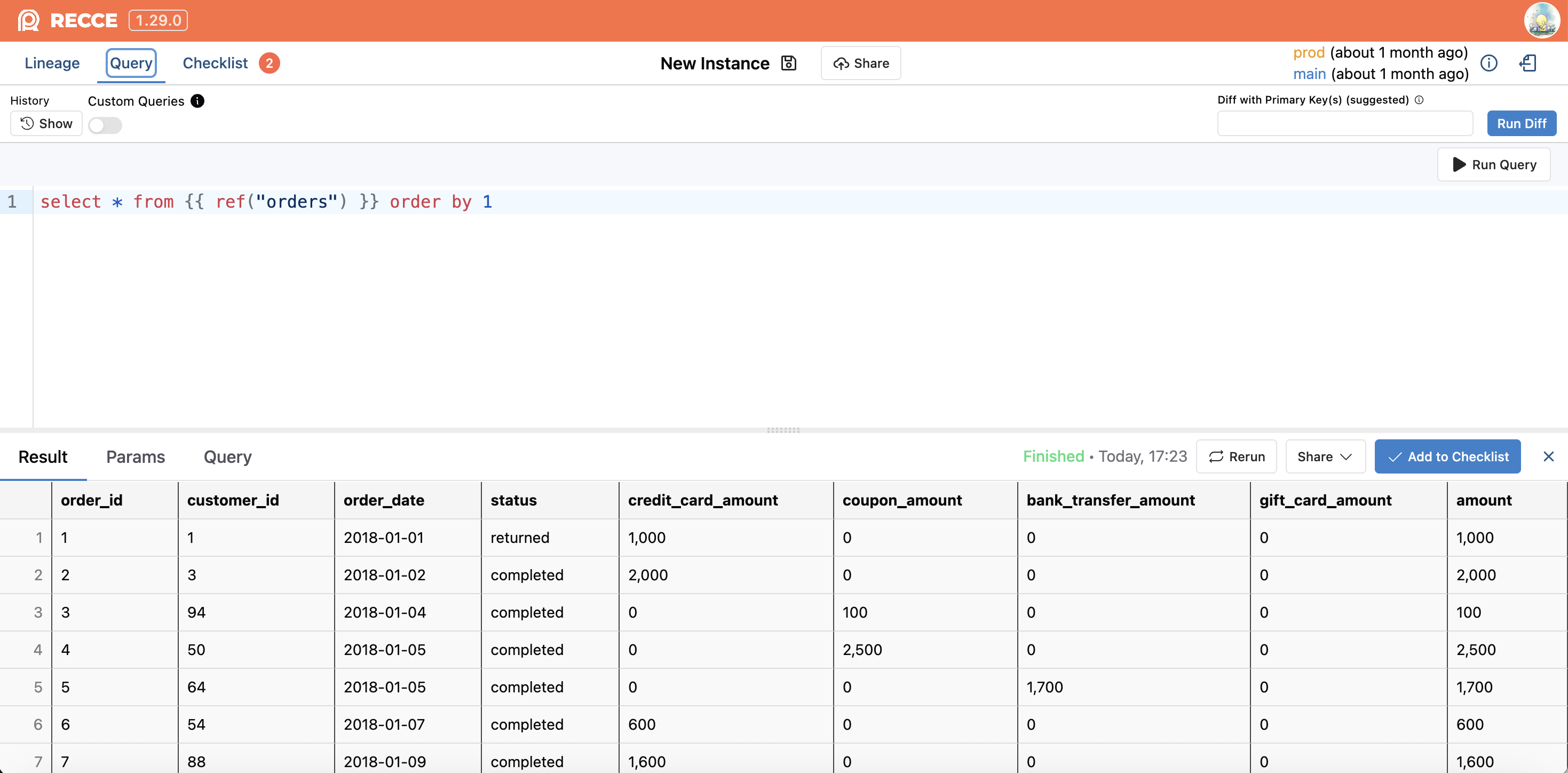
Click Add to Checklist (blue button, bottom right) to save this validation.
Expected result: Checklist tab shows your saved Query Diff.
Verify Success
Confirm you completed the tutorial:
- Lineage Diff shows
stg_paymentsand downstream models highlighted - Query Diff on
ordersshows the amount change (100x difference) - Checklist contains your saved validation
Troubleshooting
| Issue | Solution |
|---|---|
| "No artifacts found" error | Run dbt docs generate for both prod (--target-path ./target-base) and dev |
| Empty Lineage Diff | Ensure you made the model change in step 6 and ran dbt run + dbt docs generate |
| DuckDB lock error | Close any other processes using jaffle_shop.duckdb |
Next Steps
- OSS Setup: Set up Recce with your own dbt project
- Cloud vs Open Source: Compare OSS and Cloud features