Environment Best Practices
Unreliable comparison environments produce misleading validation results. When source data drifts, branches fall behind, or environments collide, you cannot trust what Recce reports.
This guide covers strategies to prepare reliable, efficient environments for Recce data validation. Recce compares a base environment (production or staging, representing your main branch) against a current environment (representing your pull request branch).
When to use this guide
- Setting up CI/CD for Recce for the first time
- Seeing inconsistent diff results across PRs
- Managing warehouse costs from accumulated PR environments
- Troubleshooting validation results that don't match expectations
Challenges this guide addresses
Several factors can affect comparison accuracy:
- Source data updates continuously
- Transformations take time to run
- Other pull requests (PRs) merge into the base branch
- Generated environments accumulate in the warehouse
Use per-PR schemas
Each PR should have its own isolated schema. This prevents interference between concurrent PRs and makes cleanup straightforward.
# profiles.yml
ci:
  schema: "{{ env_var('CI_SCHEMA') }}"

# CI workflow
env:
  CI_SCHEMA: "pr_${{ github.event.pull_request.number }}"
Benefits:
- Complete isolation between PRs
- Parallel validation without conflicts
- Easy cleanup by dropping the schema
See Environment Setup for detailed configuration.
Prepare a single base environment
Use one consistent base environment for all PRs to compare against. Options:
| Base Environment | Characteristics | Best For |
|---|---|---|
| Production | Latest merged code, full data | Accurate production comparison |
| Staging | Latest merged code, limited data | Faster comparisons, lower cost |
If using staging as base:
- Ensure transformed results reflect the latest commit of the base branch
- Use the same source data as PR environments
- Use the same transformation logic as PR environments
The staging environment should match PR environments as closely as possible, differing only in git commit.
Limit source data range
Most data is temporal. Using only recent data reduces transformation time while still validating correctness.
Strategy: Use data from the last month, excluding the current week. This ensures consistent results regardless of when transformations run.
SELECT *
FROM {{ source('your_source_name', 'orders') }}
{% if target.name != 'prod' %}
WHERE
    order_date >= DATEADD(month, -1, CURRENT_DATE)
    AND order_date < DATE_TRUNC('week', CURRENT_DATE)
{% endif %}
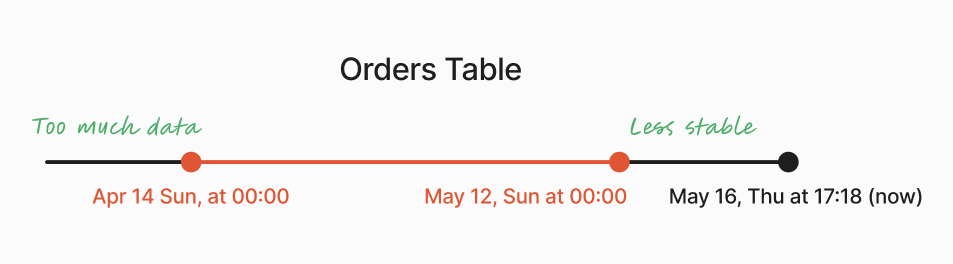
Benefits:
- Faster transformation execution
- Consistent comparison results
- Reduced warehouse costs
Reduce source data volatility
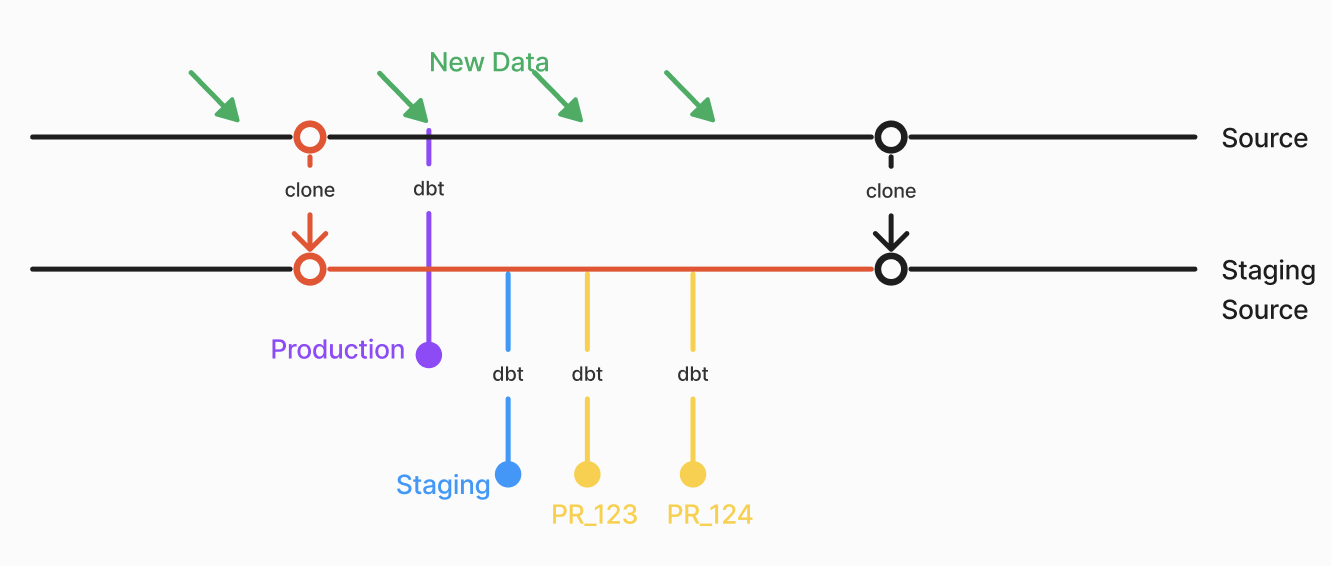
If source data updates frequently (hourly or more), comparison results can vary based on timing rather than code changes.
Strategies:
- Zero-copy clone (Snowflake, BigQuery, Databricks): Freeze source data at a specific point in time
- Weekly snapshots: Update source data weekly to reduce variability
Keep base environment current
The base environment can become outdated in two scenarios:
- New source data: If you update data weekly, update the base environment at least weekly
- PRs merged to main: Trigger base environment update on merge events
Configure your CD workflow to run:
- On merge to main (immediate update)
- On schedule (e.g., daily at 2 AM UTC)
See Setup CD for workflow configuration.
Obtain artifacts for environments
Recce uses base and current environment artifacts (manifest.json, catalog.json) to find corresponding tables in the data warehouse for comparison.
Recommended approaches:
- Recce Cloud - Automatic artifact management via
recce-cloud upload. See Setup CD and Setup CI. - dbt Cloud - Download artifacts from dbt Cloud jobs. See dbt Cloud Setup (separate guide).
Alternative approaches (for custom setups):
- Cloud storage - Upload artifacts to S3, GCS, or Azure Blob in CI
- GitHub Actions artifacts - Use
gh run downloadto retrieve from workflow runs - Stateless - Checkout the base branch and run
dbt docs generateon-demand
Keep PR branch in sync with base
If a PR runs after other PRs merge to main, the comparison mixes:
- Changes from the current PR
- Changes from other merged PRs
This produces comparison results that don't accurately reflect the current PR's impact.
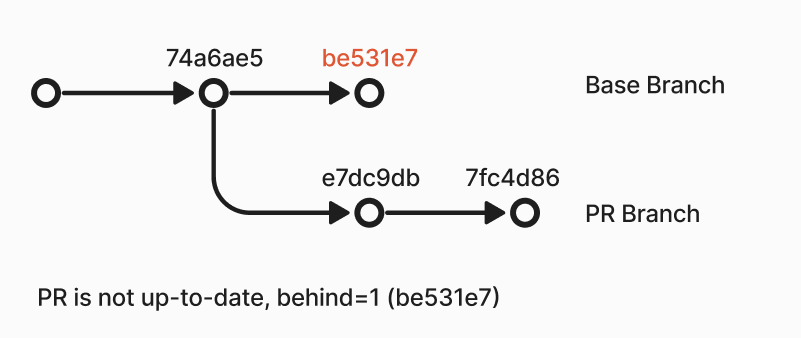
GitHub: Enable branch protection to show when PRs are outdated.
CI check: Add a workflow step to verify the PR is up-to-date:
- name: Check if PR is up-to-date
  if: github.event_name == 'pull_request'
  run: |
    git fetch origin main
    UPSTREAM=${GITHUB_BASE_REF:-'main'}
    HEAD=${GITHUB_HEAD_REF:-${GITHUB_REF#refs/heads/}}
    if [ "$(git rev-list --left-only --count ${HEAD}...origin/${UPSTREAM})" -eq 0 ]; then
      echo "Branch is up-to-date"
    else
      echo "Branch is not up-to-date"
      exit 1
    fi
Clean up PR environments
As PRs accumulate, so do generated schemas. Implement cleanup to manage warehouse storage.
On PR close: Create a workflow that drops the PR schema when the PR closes.
{% macro clear_schema(schema_name) %}
{% set drop_schema_command = "DROP SCHEMA IF EXISTS " ~ schema_name ~ " CASCADE;" %}
{% do run_query(drop_schema_command) %}
{% endmacro %}
Run the cleanup:
Scheduled cleanup: Remove schemas not used for a week.
Example configuration
| Environment | Schema | When to Run | Count | Data Range |
|---|---|---|---|---|
| Production | public |
Daily | 1 | All |
| Staging | staging |
Daily + on merge | 1 | 1 month, excluding current week |
| PR | pr_<number> |
On push | # of open PRs | 1 month, excluding current week |
Next steps
- Environment Setup - Technical configuration for profiles.yml and CI/CD
- Setup CD - Configure automatic baseline updates
- Setup CI - Configure PR validation